🎮 AI-Powered Performance Analysis

Stop Guessing.
Start Winning.

Arbiter Intelligence analyzes your gaming PC with frame-perfect precision, identifies bottlenecks using AI, and optimizes performance automatically.

15-30%
FPS Improvement
5 Min
To Analyze
10+
Automated Fixes
85%
Stutter Elimination

The Problem with Modern PC Gaming

High-end hardware doesn't guarantee smooth performance

Invisible Bottlenecks

Is your CPU or GPU holding you back? Most tools can't tell you.

Mysterious Stuttering

Frame drops and micro-stutters ruin gameplay, but what's causing them?

⚙️

200+ Settings

Modern games have hundreds of options. Which ones actually matter?

🎯

Generic Advice

Online guides don't account for YOUR specific hardware combination.

Comprehensive Performance Analysis

Professional-grade diagnostics covering every aspect of your gaming PC

🖥️

Hardware Health Check & Visual Diagnostics

Interactive motherboard component map with real-time health indicators—instantly see what's working and what needs attention.

  • Component Health Map: Visual system diagram showing CPU, RAM, PCIe slots, storage, and peripherals
  • Color-coded status: Green (healthy), orange (warnings), red (critical issues) at a glance
  • CPU monitoring: Per-core utilization, clock speeds, C-states, temperature
  • GPU telemetry: Utilization, VRAM, core/memory clocks, temperature, power draw
  • Memory analysis: RAM usage, page file activity, memory pressure events
  • Disk I/O tracking: Identify loading stutters from slow storage
  • Power events: Detect power plan changes, battery saver mode (laptops)
  • Thermal tracking: CPU/GPU temperature correlation with throttling
💯

Experience Scoring System

Comprehensive 0-100 system health score with 7-category breakdown showing exactly where your system excels or needs work.

  • Playability Score (25%): Frame pacing smoothness—the most important metric
  • Driver Health (15%): DPC latency, bad driver detection, kernel overhead
  • Background Load (15%): CPU stolen by non-game processes
  • Thermal Score (10%): Temperature monitoring and throttling detection
  • Latency Score (15%): Interrupt latency and responsiveness
  • Memory Score (10%): RAM pressure, page faults, allocation health
  • Storage Score (10%): Disk I/O bottleneck analysis
🏥

Pre-Game Health Check

Run a comprehensive system scan BEFORE gaming to catch issues that would ruin your session.

  • GPU Driver Validation: Check for known-bad driver versions before launch
  • Pending Restart Detection: Alert if Windows Update needs a reboot
  • Background Process Scan: Identify CPU/disk hogs before they cause stutters
  • Thermal Baseline: Ensure system isn't already hot before gaming starts
  • RAM Availability: Verify sufficient memory for game + OS overhead
  • 0-100 Readiness Score: Single number showing if you're ready to game
🔬

Forensic Deep Analysis

Professional-grade forensic tools for diagnosing complex issues—goes deeper than surface metrics.

  • Per-Core CPU Analysis: Identify which specific cores are bottlenecked or parked
  • Kernel-Level Tracing: ETW captures context switches, DPCs, ISRs at microsecond precision
  • Process Ancestry Tracking: Understand which parent processes spawned resource hogs
  • Driver DPC Attribution: Pinpoint exact driver modules causing latency
  • Memory Pattern Analysis: Detect memory leaks and allocation patterns
  • Game Crash Diagnosis: Analyze crash dumps and event logs for root causes
🌐

Network & System Diagnostics

Monitor background processes, network activity, and system interrupts that impact gaming.

  • Background CPU hogs: Identify processes stealing CPU during gaming
  • DPC/ISR analysis: Detect driver-level interrupt storms
  • Network latency: Track network-induced frame time spikes
  • Windows Update detection: Catch updates running during gameplay
  • Antivirus interference: Identify real-time scanning causing stutters
  • Audio buffer underruns: Detect audio driver issues
📈

Advanced Performance Metrics

Industry-standard metrics used by professional reviewers and competitive gamers.

  • 1% Low / 0.1% Low FPS: Worst-case frame rates (more important than average!)
  • Frame time variance: Measure consistency—low variance = smooth gameplay
  • Stutter detection: Automatically flag frame spikes above threshold
  • Smoothness score: 0-100 rating based on frame pacing consistency
  • Percentile distributions: 25th, 50th, 75th, 95th, 99th percentile frame times
  • Benchmark comparisons: How does your system compare to similar configs?
🔧

Intelligent Remediation Engine

Four-phase automated fix system with safe rollback—from universal tweaks to capture-specific recommendations.

  • Phase 1 - Universal Fixes: Game DVR disable, high-performance power, GPU scheduling
  • Phase 2 - Game-Specific: Tailored settings from 50+ game optimization database
  • Phase 3 - Capture-Based: Dynamic recommendations from actual session analysis
  • Phase 4 - One-Click Apply: Safe automation with admin elevation when needed
  • Risk Assessment: Low/Medium/High labels for each fix with impact warnings
  • Rollback Support: Revert any fix with backed-up original settings
  • Category Organization: Windows, GPU, Power, Network, Audio, Process fixes
  • 20+ Automated Fixes: Timer resolution, page file, visual effects, and more

Benchmark Comparison & Tracking

Save performance snapshots and compare before/after results to measure improvements from upgrades, patches, or optimizations.

  • Save Benchmarks: Preserve any capture as a named baseline (Ctrl+S)
  • Side-by-Side Comparison: Visual diff showing FPS gains/losses (Ctrl+B)
  • Patch Impact Analysis: Quantify performance changes from driver/game updates
  • Hardware Upgrade Tracking: Measure exact FPS improvement from new GPU/CPU
  • Regression Detection: Automatic alerts when performance degrades
  • CSV Export: Export benchmarks to spreadsheets for custom analysis
💾

Enhanced Export & Sharing

Share your results in whatever format works best—from beautiful Discord posts to professional spreadsheets.

  • Interactive HTML: Full report with zoomable charts and hover tooltips
  • Beautiful Discord Export: ASCII box art with PresentMon analysis and GPU telemetry
  • Reddit-Ready Format: Perfect for r/buildapc and r/techsupport threads
  • JSON Export: Raw data for programmatic analysis
  • CSV Export: Frame-by-frame data for Excel/Python analysis
  • Privacy controls: Optionally remove system info before sharing
🎮

Game-Specific Intelligence

Tailored analysis for 50+ popular games with community baselines and optimization tips.

  • Automatic detection: Recognizes game from process name
  • Performance baselines: "Your RTX 3080 is getting 95 FPS, typical is 85-110"
  • Game-specific tips: Known issues and optimization guides
  • Universal analysis: Unrecognized games get full diagnostics too
  • Multi-game tracking: Compare performance across different titles
  • Session history: Track performance over time, before/after patches

Get Optimized in 3 Simple Steps

Professional-grade analysis in just 5 minutes

1

Capture Performance

Launch Arbiter, click "Start Analysis", and play your game normally for 5 minutes. That's it.

Arbiter Intelligence
● CAPTURING
Game: Cyberpunk 2077
Duration: 3:42
FPS: 61
2

Review AI Insights

Arbiter analyzes thousands of data points and generates an interactive report with clear explanations.

Performance Report
GPU-Bound Detected
Your RTX 3080 is at 98% utilization while CPU is only 45%. Lower resolution or quality settings for higher FPS.
3

Apply Optimizations

Click "Apply Fixes" and Arbiter optimizes your system automatically. Re-test to measure improvement.

One-Click Fixes
✓ High-Performance Power Plan
✓ Hardware Accelerated GPU Scheduling
✓ Game Mode Enabled

Professional Interface, Zero Complexity

Powerful analysis tools with an intuitive, gamer-focused design
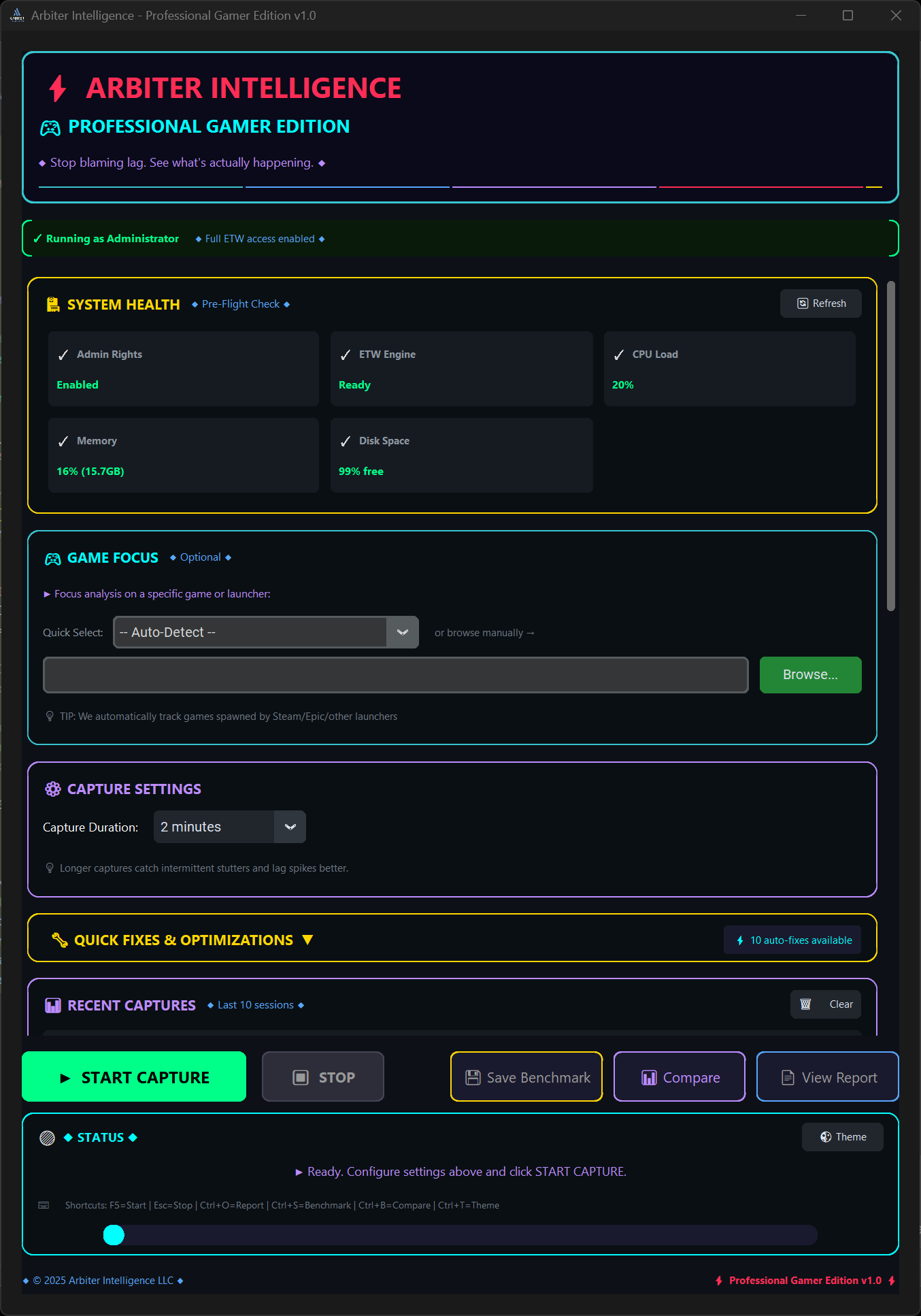
Arbiter Intelligence GUI

🎮 Game Focus Mode

Recognizes 50+ popular titles with optimized baselines. Works with any game—recognized games get tailored comparisons, unrecognized games get universal performance analysis.

⚡ One-Click Fixes

Toggle 10+ performance optimizations with a single click. Windows settings, GPU drivers, and power plans—all automated.

📈 Session History

Recent captures panel tracks your optimization journey. Compare before/after results and measure FPS improvements.

Why Arbiter Intelligence?

Feature comparison with popular alternatives

Feature Arbiter Intelligence MSI Afterburner CapFrameX GeForce Experience
FPS Monitoring ✅ + 1% Lows ✅ Basic ✅ Advanced
Frame Timing Analysis ✅ PresentMon ✅ PresentMon
AI Bottleneck Detection ✅ Automated ❌ Manual
One-Click Fixes ✅ 10+ Fixes ⚠️ Generic
Interactive Reports ✅ Beautiful ❌ Logs Only ⚠️ Static
Discord/Reddit Export ✅ Formatted
Ease of Use ✅ Simple ⚠️ Complex ⚠️ Manual ✅ Simple
GPU Support ✅ All GPUs ✅ All GPUs ✅ All GPUs ⚠️ NVIDIA Only

Available Exclusively on Steam

Get the competitive edge with professional performance analysis

Real-time performance analysis
AI-powered insights
One-click optimization
Windows 10/11 (64-bit)